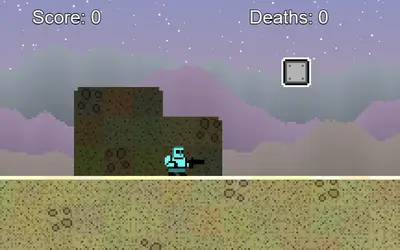
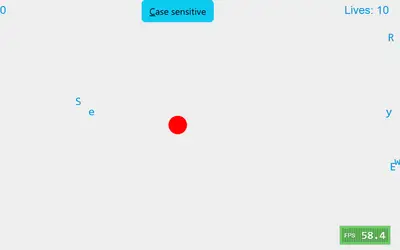
OnOff unblocked is a puzzle platformer where the world comes in two colors and only one of them is real at a time. You steer a small robot across platforms that belong either to a dark layer or a light one. Press Space and the layers trade places: what was solid becomes a faded outline, and what was an outline becomes floor. Daniel Marino and Brad Dunbar made it for the js13k game jam in 2018, a contest where the whole game has to fit in 13 kilobytes.
How to Play OnOff
From the title menu, use the up and down arrows to pick Start Game, Controls or Editor, then press Enter. Every level has one star. Touch it, the screen pauses for a moment, and the next level loads. There are 25 levels in all, and finishing the last one brings up a congratulations screen. Press Enter there to go back to the menu.
Movement is basic on purpose. Walk with A and D or the left and right arrows, and jump with W or the up arrow. The jump has a fixed, fairly short height, and if you hold the jump key the robot keeps hopping each time it lands. The edges of the screen act as walls, so you cannot walk off the sides, only fall off the bottom.
The Layer Switch Explained
Every level begins with the same layer switched on. Only the blocks of the active layer can hold you up or block your path. The other layer is drawn as a faint outline so you can plan around it.
Picture a gap too wide to jump. On the other layer there might be a platform right in the middle of it. Jump, flip in midair, land on the new platform, and flip back if you need to. Walls work the same way, because a barrier on the active layer disappears the moment you switch.
Your robot breaks apart in three situations:
- It falls off the bottom of the screen.
- It touches spikes that belong to the layer that is currently solid.
- It is inside a block when that block becomes solid.
After a short burst animation, you restart the current level from its starting spot. Attempts are unlimited, and the skull counter keeps track of your falls.
What the 25 Levels Ask of You
The first few screens teach one idea each. In the opening four you hop a plain gap, drop through floors stacked on alternating layers, cross a gap that only the other layer can bridge, and pass a wall that exists on just one side of the switch.
Spikes arrive in the second half. Some rows sit directly on top of platforms, so the floor and its danger belong to the same layer and vanish together. Later stages stack ledges in tall towers and narrow corridors where one early flip ruins the whole route.
A few levels are built partly at random each time they load. One scatters dozens of tiny square stepping blocks across the screen, and another lays a row of spike strips at random heights. The layout is rolled when the page loads, so breaking the robot or restarting from the menu keeps it the same. Only reloading the page gives you a new one.
OnOff Tips for Tough Levels
- Study both colors first. Stand still for a second and trace a route through both layers before you move.
- Flip at the peak of a jump. You are usually clear of blocks up there, which makes it the safest moment to switch.
- Use flips to fall. When floors from both layers are stacked, switch to drop through the one you are on, then switch again to catch the next one down.
- Make spikes harmless. Spikes on the faded layer cannot hurt you, so a well-timed flip turns a deadly row into a walkway.
- Take off from the very edge. With a short jump, every bit of run-up counts.
- Let go of the jump key. Holding it makes the robot bounce on landing, which can carry you into a ceiling block right as you flip.
Mistakes New Players Make
Most early deaths come from flipping while standing in an outline. Before you press Space, look at the faded shapes around the robot. If one overlaps it, move first.
Another common slip is flipping twice by accident. A double tap puts you right back where you started, often in midair over a pit. Press Space once and watch the colors change before deciding on the next move.
Build Your Own Stages
The Editor option on the title menu opens a level builder. Press H to show its help panel. Press P to add a platform, hold S and press U, D, L or R to add spikes facing up, down, left or right, and press G to test what you made. Drag pieces to move or resize them, double-click to change their layer, and Shift-click to delete. Escape takes you out of a custom level and back to the menu.
Devices, Sound and Who It Suits
OnOff is keyboard-first, so it fits a Chromebook or laptop well. A gamepad also works: the D-pad walks, the bottom face button jumps and the right face button flips. There is no touch support, so phones and tablets are out. Music and sound effects start after your first key press, so mute the tab if you are in a quiet room.
A full run takes a short session, and each level lasts well under a minute once you know it, which makes it an easy pick for a break between classes. For more adventure games, try Bounce Back, where you throw and catch a boomerang through ten random levels, or Pixel Platformer, a big level of jumping and blasting through rock with no layer trick at all.