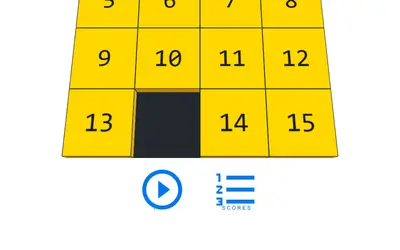
Factors Game is a bite-sized math puzzle, and you can play Factors Game unblocked on almost any device with a browser. You get a single number and sixteen tiles laid out in four rows, holding the values 1 through 16, and you move your number down through them row by row. Land on a factor and your number gets divided by it. Land on anything else and that value gets tacked on instead. You want to end up at 1, and with 256 levels there is always another board to crack.
The One Rule That Matters
Everything in this game comes down to a single question: does the tile go into your number evenly? The game sums it up in one line on the first screen: factors divide, others add, go for 1.
- Yes: your number is divided by the tile. If you hold 12 and land on 4, you now have 3.
- No: the tile gets summed in. Holding 12 and stepping onto 5 leaves you at 17.
Since anything divided by 1 stays put, the 1 tile acts like a free skip. That one rule creates a surprising amount of puzzle, because a bad addition early can leave you stuck with a prime number and no way down.
How to Play Factors Game
The very first time you open it, a short tutorial walks you through the three moves: left or right to pick a column, down to drop, and up to start over. After that, you go straight to the board.
Your starting number matches the level you picked and sits in a colored box over the board. Level 12 starts you at 12, level 200 starts you at 200. Slide left or right to pick a column, then drop into the next row. Since there are four rows, you get four moves at most. The level stops early if you hit 1 before the bottom.
At the end you are graded. Hitting 1 means ACE, single digits mean LOW, and 10 or more means High. The results screen also shows your end number, and when that number is 1 it tells you how many moves it took. Each board has a fixed layout, so retrying always shows the same tiles.
A Worked Example
Here is a made-up example to show the thinking. Say you start at 18 and the first row has a 2. Two is a factor, so dropping onto it brings you to 9. If the next row has a 3, you are down to 3, and another 3 below finishes the job. Now picture the same start where you drop onto a 5 instead. You jump to 23, a prime, and the only tiles that divide it are 1 and 23 itself, which is not on the board. Adding is now your only way forward, and you are unlikely to land on 1.
That is the core of every level: keep your number made of small factors, and steer clear of primes until the last step.
Playing for a Low Average
The number at the top labeled Avg is your real score. It is the mean of your final numbers on all completed levels, counting only your top attempt on each. The results screen also shows an average across levels 1 up to the one you just played. That means old levels are never really done. Here is how to push the average down:
- Read the whole grid before moving. Trace a route through all four rows in your head first.
- Accept a small addition if it sets up a big division. Going from 7 to 8 can be great when a 4 and a 2 sit below.
- Save primes for the end. If you can reach 14, a 2 then a 7 finishes in two steps.
- Restart freely. Swiping up resets the level at no cost, so try a different path when one goes badly.
- Revisit High results. Upgrading any old result to a perfect 1 drags the average lower.
Mistakes New Players Make
The first is dropping straight down out of habit. You can shift sideways as many times as you like before each drop, so the whole row is open to you. The second is chasing the largest divisor right away. Dividing 16 by 16 sounds perfect, but a smaller factor that leads to good tiles in the rows below often works out just as well. The last is forgetting that 1 is a safe pass, which is handy when every other tile in a row would add.
Controls and Devices
On a keyboard, use the left and right arrows (or A and D) to move and the down arrow or S to drop. Up or W restarts the level. With a mouse you can drag in the same directions, and on a touch screen you swipe. The level select screen has a slider and arrows for jumping straight to an earlier board, and your progress is saved in your browser.
The layout is tall, so a phone held upright looks best. On a wide laptop or Chromebook screen, the board sits in the middle with plenty of room.
Good for Math Class Brains
This is quiet, turn-based thinking with no timer, so it fits nicely into a few spare minutes. Most levels take under a minute once you can read a grid. It also sneaks in real practice with divisibility and mental math. Michael P. Nitowski wrote it as an open-source project.
If you like number puzzles with a calm pace, try Math Sprint Game for timed true-or-false equations, or Spider Solitaire for planning many moves ahead. Match 3 is better when you want quick pattern spotting instead. More relaxed picks are on the casual games page.